> For the complete documentation index, see [llms.txt](https://alix-lahuec.gitbook.io/zotero-roam/llms.txt). Markdown versions of documentation pages are available by appending `.md` to page URLs; this page is available as [Markdown](https://alix-lahuec.gitbook.io/zotero-roam/customization/formatting/smartblock-templates.md).
# SmartBlock templates
If you choose to use a SmartBlock to import your items' metadata, it will be triggered with the following variables:
* `item` : the raw metadata for the Zotero item
* `pdfs` : the raw metadata for the Zotero item's linked PDFs
* `notes` : the raw metadata for the Zotero item's linked notes/annotations
These provide rich information, but are also difficult to work with directly in a SmartBlock. For that reason, you will most likely want to rely on the special helper commands that are provided by the extension.
## Helper commands
{% hint style="info" %}
The following commands should only be used inside of SmartBlocks that are triggered by zoteroRoam, as they need the variables described above to function correctly.
{% endhint %}
#### ZOTEROITEMABSTRACT
Returns the contents of the item's abstract
```go
// The command takes no options
<%ZOTEROITEMABSTRACT%>
// "Lorem ipsum sed elit"
```
#### ZOTEROITEMCITATION
Returns a formatted reference for the item
{% code overflow="wrap" %}
```javascript
// OPTIONS
// style: "chicago-note-bibliography"(default)|URL to a CSL file|name of a file from the Zotero Style Repository
// --- The CSL style to generate the reference in
// locale: "en-US"|any valid locale
// --- The bibliography locale (will only apply to certain styles)
// linkwrap: 0(default)|1
// --- Should URLs be formatted as links? (0 = no, 1 = yes)
//
// Note: These options are dictated by Zotero's API structure. Read here for more details: https://www.zotero.org/support/dev/web_api/v3/basics#parameters_for_format_bib_includecontent_bib_includecontent_citation
<%ZOTEROITEMCITATION%>
// Bloch, Gary, and Linda Rozmovits. “Implementing Social Interventions in Primary Care.” __CMAJ__ 193, no. 44 (November 8, 2021): E1696–1701. https://doi.org/10.1503/cmaj.210229.
<%ZOTEROITEMCITATION:chicago-note-bibliography%>
// Bloch, Gary, and Linda Rozmovits. “Implementing Social Interventions in Primary Care.” __CMAJ__ 193, no. 44 (November 8, 2021): E1696–1701. https://doi.org/10.1503/cmaj.210229.
<%ZOTEROITEMCITATION:chicago-note-bibliography,fr-FR%>
// Bloch, Gary, et Linda Rozmovits. « Implementing Social Interventions in Primary Care ». __CMAJ__ 193, no 44 (8 novembre 2021): E1696‑1701. https://doi.org/10.1503/cmaj.210229.
<%ZOTEROITEMCITATION:apa%>
// Bloch, G., & Rozmovits, L. (2021). Implementing social interventions in primary care. __CMAJ__, __193__(44), E1696–E1701. https://doi.org/10.1503/cmaj.210229
```
{% endcode %}
#### ZOTEROITEMCOLLECTIONS
Returns the comma-separated list of the item's collections
```go
// OPTIONS
// brackets: true(default)|false
// --- Should the collection's name be surrounded by brackets?
<%ZOTEROITEMCOLLECTIONS%>
// [[Some collection]], [[Another collection]]
<%ZOTEROITEMCOLLECTIONS:true%>
// [[Some collection]], [[Another collection]]
<%ZOTEROITEMCOLLECTIONS:false%>
// Some collection, Another collection
```
#### ZOTEROITEMCREATORS
Returns the comma-separated list of the item's creators
{% code overflow="wrap" %}
```go
// OPTIONS
// brackets: true(default)|false|existing
// --- Should the creator's name be surrounded by brackets?
// --- If "existing" is used, brackets will only be added if a Roam page
// --- exists for the creator
// use_type: true(default)|false
// --- Should the creator's role be shown, if they're not an author?
<%ZOTEROITEMCREATORS%>
// [[Some author]], [[Another author]], [[An editor]] (editor)
<%ZOTEROITEMCREATORS:false%>
// Some author, Another author, An editor (editor)
<%ZOTEROITEMCREATORS:existing%>
// [[Some author]], Another author, An editor (editor)
<%ZOTEROITEMCREATORS:true,false%>
// [[Some author]], [[Another author]], [[An editor]]
```
{% endcode %}
#### ZOTEROITEMDATEADDED
Returns the DNP-formatted date on which the item was added to Zotero
```go
// OPTIONS
// brackets: true(default)|false
// --- Should the date be surrounded by brackets?
<%ZOTEROITEMDATEADDED%>
// [[January 13th, 2022]]
<%ZOTEROITEMDATEADDED:false%>
// January 13th, 2022
```
#### ZOTEROITEMLINK
Returns a link to the item within Zotero
{% code overflow="wrap" %}
```go
// OPTIONS
// type: local(default)|web
// --- The type of link that should be created (local link will open in the desktop app, web link will open in the browser)
<%ZOTEROITEMLINK%>
// zotero://select/library/items/PPD648N6
<%ZOTEROITEMLINK:local%>
// zotero://select/library/items/PPD648N6
<%ZOTEROITEMLINK:web%>
// https://www.zotero.org/users/123456/items/PPD648N6
```
{% endcode %}
#### ZOTEROITEMMETADATA
Returns the output of the extension's default metadata formatter for the item.\
This can be helpful if you'd like to base your template off of what the extension generates as the default, and only need to add elements around it (e.g, if you want to nest it under a parent block).
```go
// The command takes no options
<%ZOTEROITEMMETADATA%>
// (output too long to show)
```
#### ZOTEROITEMPUBLICATION
Returns the publication details of the item
```go
// The command takes no options
<%ZOTEROITEMPUBLICATION%>
// Journal of Scientific Studies
```
#### ZOTEROITEMRELATED
Returns the comma-separated list of the item's relations
{% code overflow="wrap" %}
```go
// OPTIONS
// brackets: true(default)|false
// --- Should the related items be surrounded with brackets?
// ---- If brackets is 'true', the related items' keys will also be prefixed by '@'
<%ZOTEROITEMRELATED%>
// [[@someCitekey]], [[@anotherCitekey]]
<%ZOTEROITEMRELATED:true%>
// [[@someCitekey]], [[@anotherCitekey]]
<%ZOTEROITEMRELATED:false%>
// someCitekey, anotherCitekey
```
{% endcode %}
#### ZOTEROITEMTAGS
Returns the space-separated list of the item's tags
```go
// OPTIONS
// brackets: true(default)|false
// --- Should the tags be surrounded with brackets?
<%ZOTEROITEMTAGS%>
// #[[some tag]] #[[another tag]]
<%ZOTEROITEMTAGS:true%>
// #[[some tag]] #[[another tag]]
<%ZOTEROITEMTAGS:false%>
// some tag another tag
```
#### ZOTEROITEMTITLE
Returns the item's title
```go
// The command takes no options
<%ZOTEROITEMTITLE%>
// Systems: a qualitative study
```
#### ZOTEROITEMTYPE
Returns the (formatted) type of the item, from current user settings.
```go
// OPTIONS
// brackets: true(default)|false
// --- Should the value be surrounded with brackets?
//
// NOTE
// The value returned is based on current Typemap settings.
// e.g, if the item is of type "journalArticle",
// and "journalArticle" is mapped to "Paper" in the Typemap,
// the command will return "Paper"
<%ZOTEROITEMTYPE%>
// [[Paper]]
<%ZOTEROITEMTYPE:true%>
// [[Paper]]
<%ZOTEROITEMTYPE:false%>
// Paper
```
#### ZOTEROITEMURL
Returns the URL (or if unavailable, the DOI URL) of the item
```go
// The command takes no options
<%ZOTEROITEMURL%>
// https://www.cmaj.ca/content/193/44/E1696
```
#### ZOTEROITEMYEAR
Returns the publication year of the item
```go
// The command takes no options
<%ZOTEROITEMYEAR%>
// 2021
```
#### ZOTERONOTES
Returns the formatted version of the item's notes/annotations, from current user settings.
```go
// The command takes no options
// All configuration will be taken from the current user settings
<%ZOTERONOTES%>
// (output too long to be shown)
```
#### ZOTEROPDFS
Returns the comma-separated list of links to the item's PDF attachments.
{% code overflow="wrap" %}
```go
// The command takes no options
<%ZOTEROPDFS%>
// [Some attachment.pdf](http://example.com/file.pdf), [Another attachment.pdf](zotero://open-pdf/library/items/FBLWXX3A)
```
{% endcode %}
## Example
My personal template
* **<%ZOTEROITEMTITLE%>** (<%ZOTEROITEMYEAR%>), <%ZOTEROITEMPUBLICATION%> \
by <%ZOTEROITEMCREATORS:existing%> \
<%ZOTEROITEMTAGS%>
* <%ATTRIBUTE:Abstract%> <%ZOTEROITEMABSTRACT%>
* <%ATTRIBUTE:Date Added%> <%ZOTEROITEMDATEADDED%>
* <%ATTRIBUTE:Date Read%>
* PDF links : <%ZOTEROPDFS%>
* <%TAG:Notes%>
* <%ZOTERONOTES%>
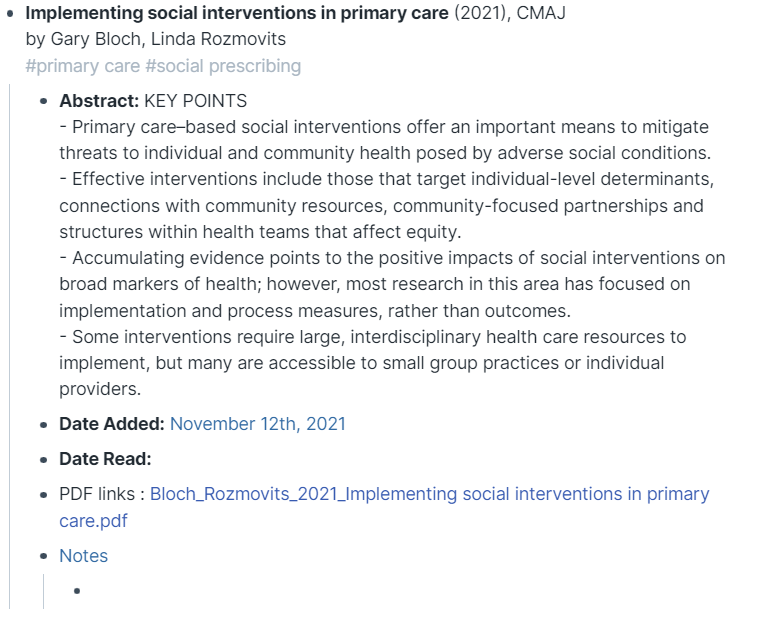
Here is what the output can look like: